Tldr
A no-code workflow that automatically classifies files piling up in Downloads, Documents, and Desktop using n8n + Upstage API, then imports them into Zotero (PDFs), Eagle (images/videos), or DEVONthink (everything else).
The Problem
Every file you download on macOS lands in the Downloads folder. PDFs need to go into Zotero, screenshots into Eagle, and the rest into DEVONthink — but doing this manually every single time creates two recurring headaches:
- Filenames are meaningless — names like
CleanShot 2026-03-26 at 17.57.45@2x.pngordocument(3).pdfare impossible to find later - App routing is tedious — for every file, you have to decide which app gets it, open that app, and trigger the import
This workflow solves both problems automatically: Upstage Document Parse extracts the file’s content, and Solar Pro 3 decides the destination folder and a clean filename. It runs every 10 minutes with zero user interaction.
Motivation
With powerful automation tools like Claude Code and OpenClaw already available, what makes the n8n + Solar combination worth using? The answer is always-on, event-triggered automation. Claude Code’s collaborative mode runs in a sandbox and can’t directly access local folders. OpenClaw is resource-heavy to run as a persistent daemon. The simplest path to always-on automation is n8n.
My specific problem: files accumulate in Downloads, Documents, and Desktop. Without periodic cleanup, they pile up and get forgotten. I wanted an automated system that handles this without intervention. The solution: a local file auto-classification system built on the Upstage API (Document Parse + Solar Pro 3). When a file appears, it analyzes the content and imports it into the right app.
I use three apps for different file types: Zotero for PDFs, Eagle for images and videos, and DEVONthink as a general-purpose database for everything else (webarchives, documents, etc.).
| App | Target Files | Import Method |
|---|---|---|
| Zotero | PDFs | zt import / zt create:item + zt attach |
| Eagle | Images, videos | eg import:path |
| DEVONthink | Everything else | dt add |
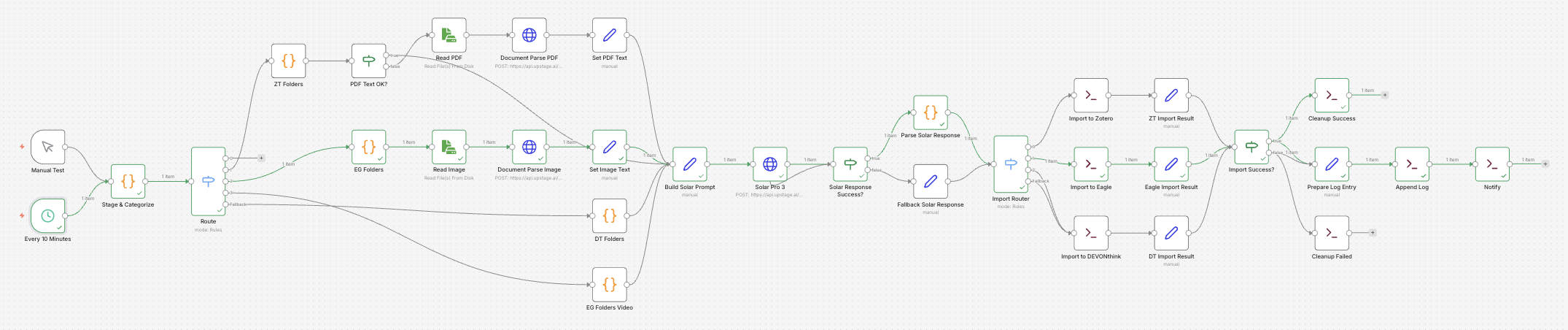
The overall flow is Scan → Extract → Classify. Files accumulated in Downloads, Documents, and Desktop are scanned, their content is extracted via Upstage Document Parse, and then Solar Pro 3 decides the target folder and filename. The final import happens through each app’s CLI.
File Classification Pipeline
Stage 1: Pre-filtering + App Routing (Stage & Categorize)
This is the pipeline’s gatekeeper. It filters out unnecessary files before any Solar API calls. Hidden files, empty files, and installers are skipped or moved to _Inbox. PDFs are validated against the %PDF- header to catch corrupt files.
| Condition | Action |
|---|---|
| Hidden / empty / temporary files | skip |
Installers (.dmg, .pkg, .app, .iso) | move to _Inbox + skip |
Invalid PDF (missing %PDF- header) | move to _Inbox + skip |
Files that pass the filter proceed as follows:
flowchart LR
    Scan["Scan"] --> Filter{"Pre-filter"}
    Filter -->|installer/bad PDF| Out["Move to _Inbox"]
    Filter -->|pass| Route{"Extension routing"}
    Route -->|pdf| ZT["Zotero"]
    Route -->|img/vid| EG["Eagle"]
    Route -->|other| DT["DEVONthink"]
Each run processes at most 12 files, with PDFs capped at 4. The PDF cap exists because Document Parse API calls are expensive and slow — OCR has a 60-second timeout per file, so too many PDFs blow out the total processing time.
Deduplication is handled structurally rather than tracked explicitly. Once a file completes the pipeline, the original is either deleted or moved to _Inbox, so it won’t be picked up again on the next run. With a 10-minute schedule and sub-1-minute processing time, runs don’t overlap.
The n8n Switch node splits by file extension into separate branches, and each branch processes files sequentially — so the same app never receives concurrent imports. The branch structure itself acts as a per-app queue.
App selection is locked to extension at this stage; Solar never overrides it. Each app has a fixed domain: Eagle handles media, Zotero handles PDFs, DEVONthink handles everything else.
File Safety: Staging Move
Between when Stage & Categorize records a file path and when processing completes, up to 30–100 seconds can pass. During that window, an external app (like CleanShot) might rename or move the file, causing an ENOENT error downstream. To prevent this, files are immediately moved to ~/.n8n-organizer/staging/ via fs.renameSync (an atomic move) as soon as they’re discovered.
- All downstream nodes work off the staging path (
filePath) - The original path is preserved in
originalPathfor logging - Crash recovery: at the start of each run, any file that has been sitting in staging for over 30 minutes is restored to
_Inbox
Stage 2: App Extract
Stage 2 has two sub-steps: fetching folder lists and extracting content.
2-1. Folder List Fetch
The actual folder/collection lists from each app are fetched via CLI, with a 30-minute TTL cache. Fetching the full folder tree for every file would create a bottleneck, so caching is applied. A 30-minute TTL fits well with the 10-minute schedule.
| App | CLI Command | Description | Output Format |
|---|---|---|---|
| Zotero | zt collections | Returns full collection list as JSON | ZK3ATEUT | 00. Inbox (key | name) |
| Eagle | eg folder:list | Returns folder tree recursively as JSON | M8RRO78FRS1VZ | Resources/Meme (id | path) |
| DEVONthink | dt databases --property name | Returns database list, name field only | [{"name": "01. Personal"}] |
dt groups --db "DB_NAME" --property name | Returns top-level groups for a DB | [{"name": "00. Inbox"}, ...] | |
dt groups --db "DB_NAME" "/group_name" --property name | Returns sub-groups | [{"name": "startup"}, ...] |
2-2. Content Extraction
Content extraction branches by file extension. PDFs and images call the Upstage Document Parse API explicitly via n8n’s HTTP Request node, making the data flow visible directly in the workflow UI. This replaced the previous approach of hiding curl calls inside Code nodes.
- PDF: extract text via
mdls(Spotlight) → if under 300 characters, run OCR via Upstage Document Parse API (HTTP Requestnode) - Image: extract text via Upstage Document Parse API (
HTTP Requestnode) - Video: no content extraction — goes straight to Solar classification based on filename
- Other: filename-based classification
Videos can’t be analyzed by Document Parse, so they pass only the folder list and filename to Solar.
flowchart LR
    Route{"Extension routing"} -->|pdf| ZT["ZT Folders"]
    Route -->|image| EG["EG Folders"]
    Route -->|video| EGV["EG Folders Video"]
    Route -->|other| DT["DT Folders"]
    ZT --> Check{"Enough text?"}
    Check -->|yes| Prompt["Build Solar Prompt"]
    Check -->|no| ReadPDF["Read PDF"] --> DPPDF["Document Parse PDF"]
    DPPDF --> SetPDF["Set PDF Text"] --> Prompt
    EG --> ReadImg["Read Image"] --> DPImg["Document Parse Image"]
    DPImg --> SetImg["Set Image Text"] --> Prompt
    EGV --> Prompt
    DT --> Prompt
Stage 3: Solar Pro 3 — Folder Classification + Filename Generation
The extracted text, original filename, and the target app’s folder list are passed to Solar Pro 3. Solar never changes the app assignment from Stage 1 — it only handles folder selection and filename generation:
{
  "document_type": "academic_paper",
  "target_folder": "ZK3ATEUT",
  "new_filename": "2026-03-25_AI_기반_정보_자동_분류.pdf",
  "rating": 8,
  "criteria": {
    "folder_match": 9,
    "filename_quality": 7,
    "content_understanding": 8
  },
  "feedback": "AI 관련 학술 자료로 Zotero 컬렉션에 적합",
  "language": "ko"
}
The initial implementation used a single confidence score, which turned out to be meaningless without calibration (Solar would return 0.95 even for wrong classifications). This was replaced with a multi-criteria evaluation system:
| Criterion | Description |
|---|---|
folder_match | How well the selected folder fits the file content (1–10) |
filename_quality | How accurately the generated filename describes the content (1–10) |
content_understanding | How precisely Solar understood the file content (1–10) |
The pipeline branches based on the overall rating:
| Rating | Action |
|---|---|
| 9–10 | Normal import + high-confidence notification |
| 6–8 | Normal import |
| 1–5 | Inbox fallback (requires manual review) |
The reasoning_effort parameter is set differently per file type. PDFs and images use high (deeper reasoning needed); videos and other files use medium (simple filename-based classification).
Solar’s JSON response is validated in the Parse Solar Response node using a bidirectional lookup map. Whether Solar responds with a key or a name, both are normalized. If neither matches, the file falls back to the default inbox folder.
| App | Fallback Location | Format |
|---|---|---|
| Zotero | 00. Inbox | key: 8UZJ5THD |
| Eagle | root | folderId omitted |
| DEVONthink | /00. Inbox | group path |
Validated with Multi-Criteria Evaluation
Instead of a single confidence score, classification is evaluated across three axes: folder_match, filename_quality, and content_understanding. Any combined rating below 6 automatically falls back to Inbox, and the individual scores along with feedback are written to the log.
Stage 4: Import
The Import Router branches into three paths based on the targetApp value. All three paths check whether the app is running via pgrep, launch it with open -a if it isn’t, and then perform the import.
| App | CLI Command | Parameters | Notes |
|---|---|---|---|
| Zotero | zt import FILE --collection COL | FILE: file path to import, --collection: target collection key | On failure: two-step fallback via zt create:item --type document --title TITLE --collection COL + zt attach FILE --key KEY |
| Eagle | eg import:path --path FILE --name NAME --folderId FID | --path: file path, --name: display name, --folderId: target folder ID | Quotes stripped from filename before passing to --name |
| DEVONthink | dt add FILE --db "01. Personal" --at PATH --name NAME | FILE: file path, --db: target database, --at: group path, --name: display name | Fixed database: 01. Personal |
Stage 5: Cleanup & Logging
The pipeline branches based on import success.
| Result | Action |
|---|---|
| Success | Delete the original file |
| Failure | Move the original to ~/Downloads/_Inbox/ |
In both cases, a JSON log entry is appended to ~/.n8n-organizer/log.jsonl and a macOS notification is displayed via osascript.
Upstage API Usage
Document Parse (endpoint: document-digitization, model: document-parse)
| Target | Mode | Purpose |
|---|---|---|
| PDF (when mdls returns < 300 chars) | document-parse, ocr=auto | Text extraction from scanned PDFs |
| Images (screenshots, charts) | document-parse, ocr=auto | Text and diagram description from screen content |
| General photos | document-parse, ocr=auto | Limitation: cannot analyze landscapes, people, or food |
Solar Pro 3 (chat/completions)
- Text-only model (102B MoE)
- Determines filename and folder based on text extracted by Document Parse
- Cannot analyze images directly — depends on Document Parse’s text output
reasoning_effort: PDF/image →high, video/other →medium- Returns multi-criteria evaluation JSON schema:
rating(overall score) +criteria(folder_match, filename_quality, content_understanding) +feedback
Node Breakdown (v5, 33 nodes)
| Type | Count | Role |
|---|---|---|
| Schedule/Manual Trigger | 2 | 10-minute schedule, manual testing |
| Code | 6 | Stage & Categorize, ZT Folders, EG Folders, EG Folders Video, DT Folders, Parse Solar Response |
| Execute Command | 7 | CLI imports (Zotero/Eagle/DEVONthink), file cleanup, notifications, log writing |
| Set | 8 | Prompt assembly, fallback data, import result mapping (3), log preparation, PDF/image text setting (2) |
| HTTP Request | 3 | Solar Pro 3 API call, Document Parse PDF, Document Parse Image |
| ReadWriteFile | 2 | Read PDF, Read Image |
| Switch | 2 | Extension routing, app routing |
| If | 3 | Solar Response Success?, Import Success?, PDF Text OK? |
Fault Tolerance
Most IO nodes have continueOnFail set, so a single file failure doesn’t halt the entire pipeline. Import nodes verify file existence with [ ! -f "$FP" ] before running. If Solar response parsing fails, the node strips markdown code fences and retries. Content text is truncated to 4,000 characters to prevent Solar’s context window from overflowing.
Migration: Minimizing Code Nodes
The initial workflow had 10 Code nodes with over 400 lines of JavaScript. Code nodes make it hard to trace data flow in the n8n UI. Following a “only convert what’s a sure bet” principle, 4 Code nodes were replaced with native nodes.
| Target | Before | After |
|---|---|---|
| Fallback Solar Response | Code (40 lines) | Set node |
| Import to Zotero | Code (65 lines) | Execute Command + Set |
| Import to Eagle | Code (40 lines) | Execute Command + Set |
| Import to DEVONthink | Code (40 lines) | Execute Command + Set |
Issues encountered during migration:
- CLI stdout swallowing the “OK” marker — tools like
dt addprint JSON to stdout, which interfered with success detection → fixed by adding>/dev/null - ReadWriteFile binary errors — the Append Log node was replaced with an Execute Command heredoc
- Deduplication concerns — handled structurally by deleting or moving files after processing; no hash tracking needed
Operational Tips
PM2 keeps the n8n process running persistently. ecosystem.config.js sets autorestart: true for crash recovery and max_memory_restart: '512M' for memory leak recovery.
# Start
pm2 start ecosystem.config.js

# Check status
pm2 status n8n-organizer

# View logs
pm2 logs n8n-organizer --lines 50
Config Files
| Path | Purpose |
|---|---|
~/.n8n-organizer/zt-token | Zotero CLI token |
~/.n8n-organizer/folder-choices-cache.json | Folder list cache (30-minute TTL) |
~/.n8n-organizer/log.jsonl | Processing log (JSONL) |
~/.n8n-organizer/staging/ | Temporary staging directory for in-flight files (atomic move) |
Limitations and Future Work
- Photo naming — without a vision API, filename-based classification is the ceiling for general photos. Claude Haiku Vision is a candidate for future exploration.
- Rating threshold tuning — the current threshold of 6 is an initial value; log analysis will be needed to calibrate it properly.
- CLI tool documentation —
zt(zotero-cli),eg(eagle-cli), anddt(devonthink-cli) are custom-built tools. The--helpoutput and README need improvement.